


Real Bass electric bass guitar
4.52.22K Reviews
App Specs
- Version
- 7.33.11
- Updated On
- License
- Free
- Downloads
- 10,000,000+
- Developer
- Kolb Apps
- Categories
- Music
- Platform
- Android, iOS
Screenshots
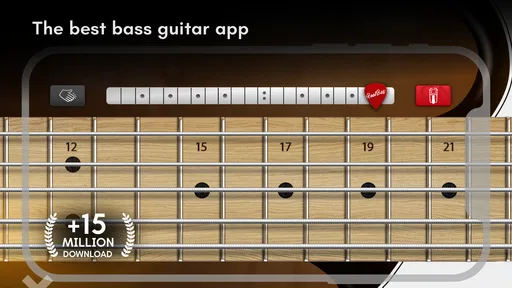
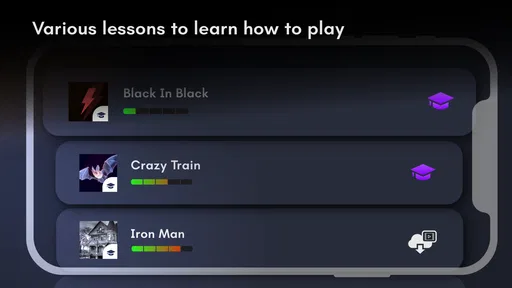
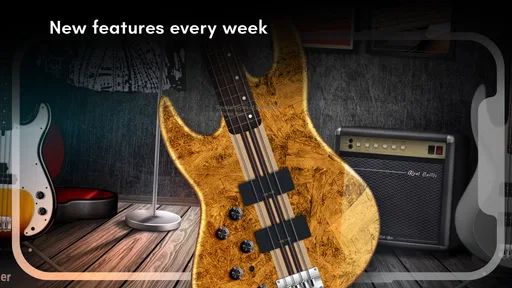
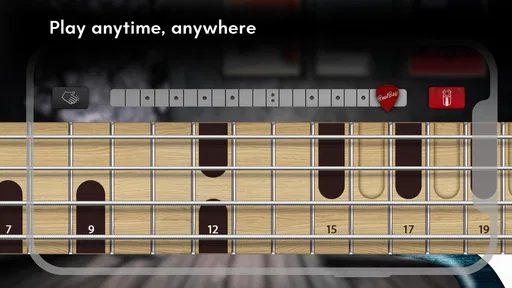
 Analysis by AppCompare
I find mobile instrument games most useful when they make it easy to try an idea, not when they pretend a phone can replace the feel of strings under your fingers. Real Bass is a music game from Kolb Apps built around playing bass parts on a touchscreen. It gives curious beginners a low-pressure place to explore notes and riffs, and it can be a handy musical diversion for players who want to experiment away from their instrument. The key is to treat it as a virtual practice aid rather than a complete bass course.
Where first sessions can feel awkward
The first hurdle is physical: tapping a screen is not the same motion as fretting and plucking a bass. If a note feels late or a phrase comes out unevenly, that may be the difference between touch input and a real instrument, not a sign that you have no sense of rhythm. I’d start with a short, familiar phrase and focus on getting comfortable with the on-screen playing before trying to follow a full song.
It also helps to separate learning a musical idea from learning bass technique. A phone can help me hear and remember a sequence of notes, but it cannot give my fretting hand the same coordination or build the finger strength required on strings. Beginners should use the game to get curious about bass lines, then move to a real bass or a more structured lesson when they want to work on posture, clean fretting, and consistent plucking.
Real Bass is free to download, with optional in-app purchases ranging from $1.99 to $18.99 per item. I’d try the basic experience before spending anything: first check that the touchscreen layout suits your hands and that the sound is enjoyable through your usual listening setup. It is rated for Everyone, though that does not automatically make every lesson equally easy for every age or skill level. The game has a 4.5 average from around 85,000 ratings and over 10 million installs, so it has found a broad audience, but those figures cannot tell you whether its particular playing style will click for you.
Making practice feel manageable
I like to make a short session feel achievable by deciding what I want to notice before I start: a note sequence, a steadier rhythm, or simply whether a riff is fun to play. That small target keeps tapping from becoming aimless, and it gives me a useful way to end the session even if the phrase still needs work. A little intention goes a long way when practice happens in spare moments.
Simple setup checks before you play
If the sound seems absent or a play-along session does not behave as expected, I’d check the basics before restarting repeatedly: make sure the device’s media volume is up, confirm that sound is not routed to another connected listening device, and try a few taps in the regular playing area. For a song session, first make sure the music you want to use is available in the place the app expects you to select it from. These quick checks can distinguish a setup snag from a problem with the playing itself.
Touchscreen space matters, too. A compact phone can make quick note changes fiddly, especially if you are holding it in one hand or tapping while walking. I get a more controlled session by placing the device on a steady surface and using both hands deliberately. That small adjustment is more useful than rushing through a phrase and blaming the game for missed taps.
Worth Reading Before You Choose

EA SPORTS FC Mobile 26 Is a Bigger Football Game, but It Takes Time

Flipboard Shows What News Apps Must Do Beyond the Feed

Switching to Android Auto Means Rethinking Your Driving Routine

Google Calendar Makes a Crowded Week Easier to Manage

Ludo King Makes the Most of the Minutes Between Plans

Baby Panda World Brings Quick Play to Modern Phones, but Its Game Library Feels Busy
A calmer way to recover a session
When a run goes off track, I avoid changing several things at once. I return to a simple phrase, play it slowly enough to see where my timing slips, and then bring the pace back up when the movement feels predictable. If the app stops responding, I close and reopen it once, then test the same short phrase before setting up a longer session again. This keeps troubleshooting from turning into a frustrating cycle of random taps and repeated restarts.
Recording can make practice more useful if I give myself one clear question before pressing record: are the notes in the right order, or is my timing steady? Listening back with one goal in mind makes it easier to notice progress than judging a whole take as simply good or bad. I would also treat a recording as a snapshot, not a formal measure of ability; the value is in hearing what to try differently next time.
When a different tool is the better choice
A virtual bass is strongest for quick exploration, repetition, and trying out a riff when carrying an instrument is inconvenient. It is less suitable if your goal is to develop the physical habits of bass playing or to prepare for a band rehearsal where your timing must lock in with other musicians. In those situations, practice on a real instrument gives feedback the touchscreen cannot provide. A structured course may also be a better fit if you want a sequenced curriculum rather than a flexible place to play.
Compared with watching a bass lesson, the game puts the instrument directly under your fingers, so you can test a note sequence instead of only observing someone else. Compared with a real bass, it is easier to pick up for a few minutes but necessarily less tactile. I see that as a useful trade-off for casual practice, not a reason to expect the same results from both. If you already own a bass, the app can supplement your routine; it should not replace time spent learning on the instrument itself.
Who will get the most from it
I’d recommend it to someone who is bass-curious, wants to try familiar riffs in a low-pressure setting, or needs a small creative break during the day. A realistic use is a few minutes at home between other tasks: choose a short musical idea, repeat it until the taps feel consistent, then record a take if you want to hear it back. That makes the session purposeful without turning a casual game into a demanding practice assignment.
It is a weaker match for anyone who expects a phone to teach complete real-world technique, or who needs detailed feedback on finger placement and tone. Experienced players may enjoy it as a playful sketchpad, but should not expect the screen to reproduce the subtleties of their own instrument. If your main goal is a guided path from the first lesson to confident performance, I would look for a dedicated teaching resource alongside it.
What the app is, and what it is not
Kolb Apps released the game on June 18, 2012, and its current version is 7.33.7. It supports devices running Android 7.0 or later, and the free entry point makes it easy to see whether the virtual instrument suits you before considering any paid items. Those details matter most when deciding whether an older device can run it and whether you want to keep your practice entirely within a mobile game.
The lessons and play-along approach can make musical exploration feel approachable, but I would not confuse that with a guarantee of steady improvement. Progress depends on what you practice and how carefully you listen. One practical habit is to keep each session narrow: pick one riff, repeat it, and note what still feels awkward. That turns a quick game into a small, repeatable exercise rather than a long session of tapping without a clear aim.
Getting Started with Real Bass
First things first, downloading Real Bass is a breeze. It’s available on both Android and iOS, so no matter what device you’re rocking, you’re covered. Once you've got it installed, you’re greeted with an interface that’s both user-friendly and visually appealing. Honestly, I was surprised at how quickly I was able to jump in and start playing around with the different features.
Exploring the Features
One of the standout features is the variety of bass guitar sounds. Whether you’re into jazz, rock, or funk, there’s a sound for you. I spent a good amount of time just experimenting with the different tones, and it’s impressive how authentic they sound. You can really feel the depth and richness in each note, which makes it feel like you’re playing a real instrument.
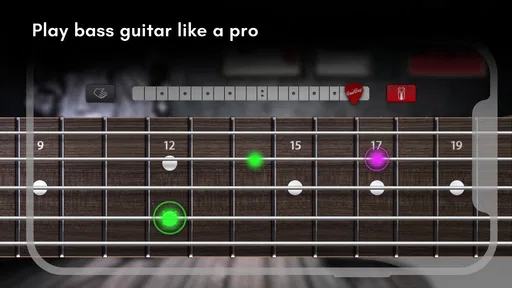
Another thing I loved is the ability to customize your playing experience. The app offers different modes like solo, chord, and play along, each catering to different skill levels and interests. If you’re just starting out, the chord mode is super helpful. It guides you through the basics and helps you get a feel for the instrument without overwhelming you.
Playing Along with Your Favorites
Now, here’s where Real Bass truly shines. The play-along feature is fantastic for jamming with your favorite tracks. You can import your own music library and let the app guide you in playing along. It’s like having a personal music tutor right in your pocket. I spent hours just jamming to my favorite tunes, and it was incredibly rewarding to see my improvement over time.
For those who are more competitive or like to track progress, the app also includes a recording feature. This lets you record your sessions, which you can then listen back to or share with friends. It’s a great way to keep track of your progress and see how far you’ve come.
Design and Usability
I can’t stress enough how important a good design is for an app’s usability, and Real Bass does not disappoint. The layout is intuitive, and everything is where you’d expect it to be. This means less time fumbling around the app and more time actually playing. The developers have obviously put a lot of thought into making the app accessible for all users, which I really appreciate.
Plus, the graphics are clean and modern. The bass guitar animations are smooth, and everything runs without a hitch, even on older devices. This attention to detail enhances the overall experience and makes it feel more like you’re interacting with a physical instrument.
Final Thoughts
Overall, I’d say Real Bass is a fantastic app for anyone interested in learning or playing the bass guitar. Whether you’re a beginner or an experienced player looking for a portable practice tool, this app has something for everyone. The combination of realistic sounds, user-friendly interface, and customizable features makes it a joy to use.
If you’re on the fence about giving it a try, I’d recommend just diving in. You might find yourself strumming away for hours and discovering a new passion for music. So go ahead, download Real Bass, and start your musical journey today!
Pros
- Realistic sound quality for an authentic experience.
- User-friendly interface for easy navigation.
- Customizable settings for personalized play.
- Includes tutorials for beginners.
- Compatible with most devices.
Cons
- Limited free features in the basic version.
- Ads can interrupt the playing experience.
- Requires internet for some features.
- Advanced features need in-app purchases.
- May drain battery quickly on older devices.
FAQs for Real Bass electric bass guitar
What is Real Bass and what features does it offer?
Real Bass is a virtual electric bass guitar app designed for musicians of all skill levels. It offers a realistic sound experience with a variety of bass guitar models to choose from. Users can access different playing modes, including solo and chord modes, and utilize a multi-touch interface to simulate playing a real bass guitar.
Is Real Bass suitable for beginners?
Yes, Real Bass is suitable for beginners. The app includes a tutorial mode that helps new users learn the basics of playing the bass guitar. It also offers a user-friendly interface and adjustable difficulty levels, making it easier for beginners to start playing and gradually improve their skills.
Does Real Bass require an internet connection to function?
Real Bass does not require an internet connection to function, which allows users to practice and play music offline. However, for accessing additional content like updates or purchasing premium features, an internet connection might be necessary. This offline capability is ideal for musicians who want to play anywhere, anytime.
Are there any in-app purchases or premium features in Real Bass?
Yes, Real Bass offers in-app purchases and premium features. While the basic version is free, users can purchase additional bass models, sound effects, and advanced features to enhance their experience. These purchases are optional and are designed to provide more variety and customization for serious musicians.
Can Real Bass be connected to external speakers or amplifiers?
Yes, Real Bass can be connected to external speakers or amplifiers. Users can use a standard audio cable or Bluetooth connection to enhance the sound output and play through larger speakers. This feature is beneficial for live performances or practice sessions with a band, providing a more authentic sound experience.


